Apple Health brings together your health, well being, and physical activity in one place.
Anúncios
Instead of switching between multiple apps, you can view your health data in a much more organized way.
When paired with compatible devices, it offers even more comprehensive health monitoring.
Next, you’ll discover the main features of Apple Health and how they can simplify your routine.
How Apple Health Monitors your Body and Activities
Apple Health is the built in health app on the iPhone.

It works as a central hub, organizing information from multiple sources in a single place.
The app automatically collects data from your iPhone, Apple Watch, and various compatible devices.
This information is displayed through charts and trends, making it easy to follow your progress over time.
As a result, it becomes much easier to understand your habits and recognize small changes in your daily routine.
Features every User should Know
Apple Health goes far beyond counting steps. It offers a variety of tools to help you monitor your health.
Some of its most useful features include:
- Personalized dashboard with your most used health metrics
- Interactive charts and trend analysis
- Medication tracking with reminders
- Sleep monitoring
- Mood and mental state tracking
- Heart rate monitoring
- Physical activity history
- Menstrual cycle tracking
- Secure storage of your health information
Daily Benefits of Apple Health for your Health
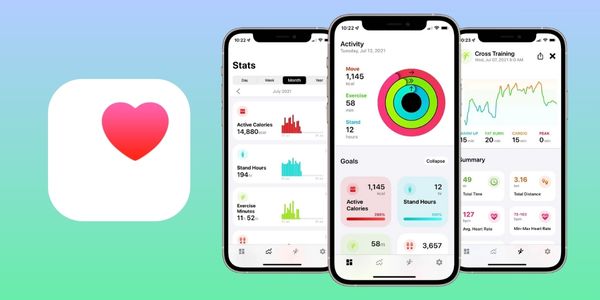
One of Apple Health’s biggest strengths is that it combines information from different sources into a single platform.
This eliminates the need to check several apps throughout the day and makes health tracking much more organized.
On a daily basis, the app can help you:
- track your physical activity
- see changes in your sleep quality
- monitor heart related health metrics
- record medications and vitamins
- follow changes in your weight
- identify important trends over time
For example, you may notice that you’re walking more, sleeping less, or maintaining a more consistent exercise routine.
Keep in mind that this information does not replace guidance from healthcare professionals.
Setting up and Personalizing the App on your iPhone
Getting started with the app is very simple.
During the initial setup, you’ll only need to enter a few basic details to personalize your experience.
These include:
- Age
- Sex
- Height
- Weight
- Medications (optional)
- Important medical information
After that, you can choose which categories appear on your home screen.
HealthKit lets you control which apps and devices can access or share your health information.
This ensures that only the apps that are actually necessary continue syncing data with the system.
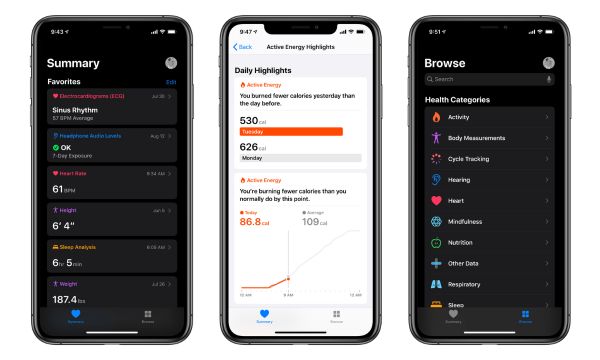
What Data can Apple Health Record?
One of Apple Health’s greatest advantages is the wide variety of health data it can store.
The app includes hundreds of different categories, allowing you to monitor many aspects of your daily life in one place.
Here are some of the main categories available:
| Category | Examples of Information |
|---|---|
| Activity | Steps, distance, calories, workouts, and active minutes |
| Body | Weight, BMI, body fat percentage, and lean body mass |
| Heart | Heart rate, blood pressure, heart rate variability (HRV), and ECG (on compatible devices) |
| Sleep | Sleep duration, schedule, sleep stages, and sleep goals |
| Health | Blood glucose, medications, mood, vaccinations, symptoms, menstrual cycle, and pregnancy |
Having all of this information organized makes monitoring your health much easier.
In addition, reviewing a complete history can help you identify changes that might otherwise go unnoticed.
Integrating Apple Health with Other Apps and Devices
One of Apple Health’s greatest strengths is its extensive integration with apps and devices.
Through HealthKit, hundreds of apps can share information with the system, provided that you grant permission.
Some of the best known examples include:
- Strava
- MyFitnessPal
- Headspace
- AutoSleep
- Cronometer
- Apple Watch
- Smart scales
- Blood glucose monitors
- Blood pressure monitors
- Smart rings and other compatible devices
This integration prevents duplicate records and keeps nearly all your health information together in a single app.
In practice, this means spending less time switching between different platforms and more time tracking your progress.
The more compatible devices you connect, the more complete your health history becomes.
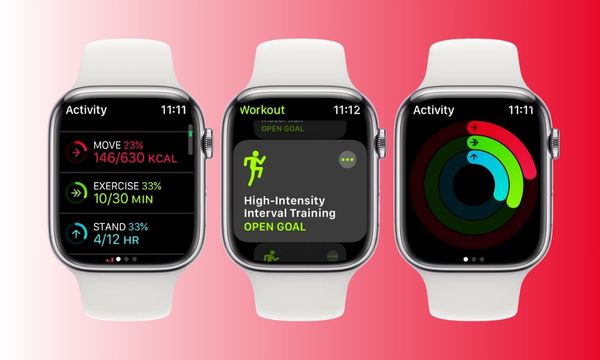
How to Get the Most out of the App in your Daily Routine
To take full advantage of the app, a few simple habits can make a big difference.
Some practices that help you get the most out of its features include:
- Connect all your compatible devices
- Review the permissions of your installed apps
- Record your medications regularly
- Use the sleep tracking feature
- Log your mood and mental state
- Review the app’s weekly highlights
- Keep your Apple Watch synchronized whenever possible
Another important tip is to focus on trends, rather than a single isolated result.
Changes over several weeks or months often provide better insights into your habits and quality of life.
Over time, Apple Health becomes a true dashboard for your health.
Who can Benefit most from Apple Health?
The app was designed for anyone who wants to monitor their health in a more organized way.
It is especially useful for:
- People who want to track their physical activity
- Apple Watch users
- Anyone who wants to monitor their sleep quality
- People who take medications every day
- Users who monitor their heart rate, blood glucose, or blood pressure
- Expecting mothers who want to keep track of their pregnancy
- Anyone who wants to keep all their health data in a single application
Even if you only use an iPhone, you can already take advantage of many Apple Health features.
As you connect additional compatible devices and apps, your health tracking becomes even more comprehensive.
Conclusion
Apple Health brings together important information about your health in one convenient place.
This includes physical activity, sleep, heart rate, medications, and many other health indicators.
Its charts, trends, and integration with a wide range of devices make it easier to monitor your daily routine.
As a result, it’s much simpler to visualize your progress over time.
The app doesn’t replace professional medical advice, but it can help you better understand your daily habits.
And let’s be honest, tracking your health is easier when all your important information is in one place!