You pick up your phone for a minute and, before you know it, your screen time has already reached 40.
Anúncios
Reducing your usage doesn’t mean abandoning your phone, but learning to use your hours of the day better.
Some apps help you identify habits, block distractions and create limits.
Each one uses a strategy to help you step away from the screen and remember that there is life beyond it.
Reduce Screen Time with Strategies that Work
Reducing screen time becomes easier when you understand first how you’re using your phone.
Before you start blocking everything, observe which apps consume most of your time and at what times.
Some simple strategies can help:
- Set daily limits for apps.
- Block distractions during focus periods.
- Disable unnecessary notifications.
- Create phone free times.
- Track your progress.
- Replace a few minutes of scrolling with another activity.
The idea isn’t to turn your smartphone into an enemy.
It’s to make it work in your favor, instead of stealing half an hour every time you open a social network!
Forest App: Turn Focus into a Fun Challenge
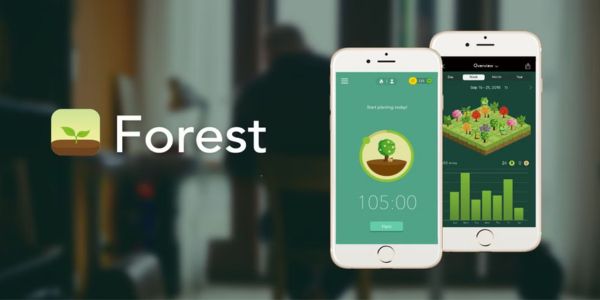
Forest turns focus into a game: you plant a virtual tree that grows while you stay away from your phone.
The idea is simple and works well for those who like turning small goals into challenges.
Main features
- Gamified focus timer
- Virtual forest
- Lists of allowed apps
- Phone usage tracking
- Tree species to unlock
- Soundscapes
- Sessions shared with friends
- Real tree planting through an environmental partnership
The app also lets you track your daily phone usage, helping you better visualize your habits.
Premium Version
Forest offers in app purchases and plans starting at $5.99.
💡 Usage tip: Start with short sessions, such as 15 or 20 minutes, and gradually increase them.
StayFree App: Track and Control your Phone Usage
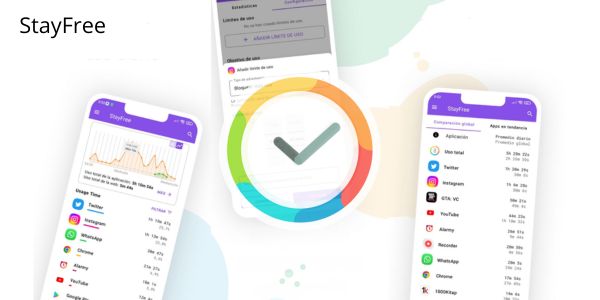
StayFree focuses on tracking habits to show where your screen time is going.
It’s a good option for Android and for those who like to keep track of the numbers for each app.
Main features
- Usage time monitoring
- Statistics by app
- Usage limits
- App blocking
- Usage history
- Usage alerts
- Habit comparison
- Features to control distractions
- Goal tracking
With this data, it’s easier to identify that app that seemed to take “just a few minutes” each day.
Spoiler: it probably wasn’t just a few minutes!
💡 Usage tip: First, observe which apps consume most of your time before creating limits. That way, you can target the real villain instead of blocking everything at once.
Opal App: Block Distractions and Create Focus Moments

Opal combines limits, blocks and focus sessions to create periods away from distractions.
It also offers real time data, focus scores and reports to track your progress.
Main features
- App blocking
- Focus sessions
- Time limits
- Open limits
- Scheduled rules
- Focus reports
- Focus Score
- Timers
- Stricter blocking mode
Premium Version
Opal Pro has plans starting at US$ 4.99, with extra features to customize app control and blocking.
💡 Usage tip: Create a session for the times when you get most distracted, such as during work or before going to bed.
Having automatic blocking helps avoid that internal negotiation of “just five more minutes.”
Find out Which Apps Consume Most of your Time
Before trying to reduce screen time, it’s worth finding out exactly where it’s going.
You can start by checking your daily report and identifying the apps that appear at the top.
Pay particular attention to those that you open several times throughout the day.
An app used for a few minutes during each access can end up adding up to a considerable amount of time.
After identifying the biggest time consumers, it becomes much easier to decide where to set limits.
And this step can be a little reality check.
Sometimes, your phone knows much more about your habits than you’d like it to.

Set Limits to Avoid Excessive Phone Use
Setting limits is one of the most practical ways to control screen time.
You can start by gradually reducing the amount of time allowed for the apps that distract you the most.
Some ideas:
- Social media: limit access during work or focus periods.
- Videos: set a specific time to watch without overdoing it.
- Games: set a daily duration to keep usage under control.
- Messages: disable alerts that aren’t actually urgent.
- Shopping apps: avoid promotional notifications that encourage new purchases.
You don’t have to cut everything at once.
A gradual reduction can be easier to maintain than trying to go from four hours to zero all at once.
Small Changes to Have more Control Over your Routine
Reducing screen time also involves small changes outside of apps.
Keeping your phone away during meals, for example, already creates a moment of the day without notifications.
Another idea is to avoid taking the device to bed if you tend to spend a lot of time scrolling before going to sleep.
You can also:
- Disable unnecessary notifications to reduce interruptions.
- Remove social media from the home screen to avoid automatic access.
- Use your phone at set times during the day.
- Create screen free periods to rest your mind and disconnect.
- Replace some scrolling moments with reading, walking or music.
The goal isn’t to live as if the smartphone had just been invented yesterday.
It’s simply to take back a few minutes of the day that tend to disappear without you noticing.
How to Choose the Ideal App to Reduce Screen Time
The best screen time app for you mainly depends on how you like to manage your habits.
| App | Best for | Highlight |
|---|---|---|
| Forest | Gamifying focus | Virtual trees |
| StayFree | Analyzing habits | Usage statistics |
| Opal | Blocking distractions | Sessions and limits |
In the end, reducing screen time doesn’t have to mean throwing your phone out the window!
Choose a strategy that feels possible for your routine, start gradually and track your progress.
The goal is to have more control over how and when you use your phone.
That way, you can make better use of your time while still keeping technology on your side!