The Apple Fitness app puts your workouts and activities all in one place, directly on your iPhone.
Anúncios
But the app goes beyond simply recording exercises.
With an Apple Watch, you can track even more details about your routine.
And there are features that can make your workout much more interesting day to day.
What is Apple Fitness and What is it For?

The app helps you track physical activity, workouts and progress.
It brings together information about your exercises and lets you view different data related to your routine.
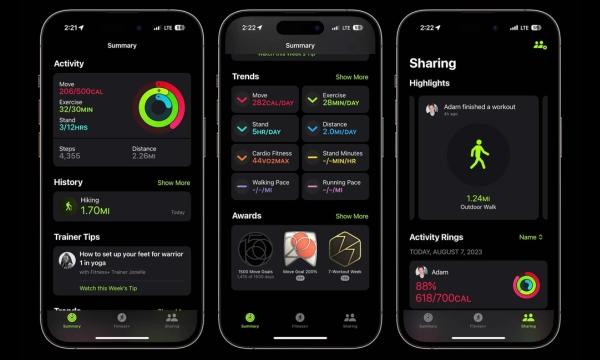
In the Summary tab, you can choose to follow activity, workouts, trends and achievements.
The tool also lets you set goals and track your progress over time.
With a compatible Apple Watch, Apple Fitness uses data from the watch to provide a more complete overview.
And, let’s be honest, being able to look at the data after that workout that nearly destroyed your legs has its value!
How to Connect Apple Fitness to Apple Watch
Apple Fitness works even better when connected to a compatible Apple Watch.
Setup takes place on the iPhone during the pairing process for the watch.
To get started:
- Pair your Apple Watch with your iPhone.
- Open the app on your phone.
- Check that your activity data appears correctly.
- Review your information and goals.
- Start a workout from your watch or the app.
After that, Apple Fitness works as a dashboard for checking your activities.
The watch is responsible for recording different metrics during your workouts.
Track your Workouts and Activities through the App
One of the most interesting parts of the app is being able to check your workouts after completing them.
Depending on the workout and device, you may see duration, calories and other metrics.
You can also start certain workouts directly from your iPhone.
Available options include activities such as HIIT, outdoor running and outdoor cycling.
This makes Apple Fitness interesting both for people who already exercise regularly and for those trying to build consistency.
Check your Data and See your Progress
Looking at a single workout can be interesting.
But tracking multiple records over time is even better for noticing changes in your routine.
Apple Fitness offers Trends, activity details, training load and achievements, depending on the device.
These data points help you identify patterns.
You can also notice periods when your routine became less consistent.
What you can track:
- Workout frequency shows how often you have been exercising.
- Workout duration indicates how much time you dedicate to each activity.
- Daily activity shows your level of movement throughout the day.
- Goal progress tracks how you are progressing toward your objectives.
- Performance trends reveal changes over time.
- Achievements earned record the milestones you have already reached.
This way, the app becomes a history of your routine.
Explore the Workouts Available on Apple Fitness+
There is an important difference here: Apple Fitness and Apple Fitness+ are not exactly the same thing.
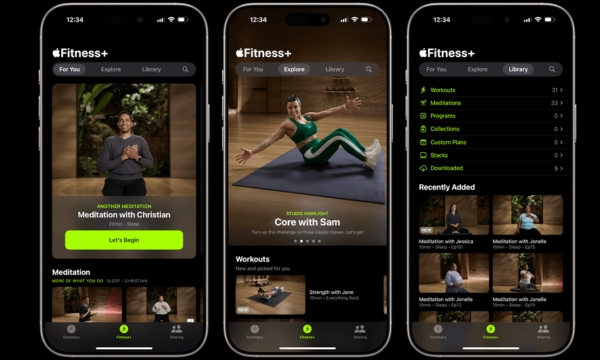
Fitness brings together your data, while Fitness+ offers guided workouts and meditations through a subscription.
Currently, Fitness+ offers 12 workout types, in addition to meditation, with sessions ranging from five to 45 minutes.
Options include strength, HIIT, yoga, cycling, running, Pilates, dance and core.
New content is also added regularly.
The service also offers personalized recommendations and plans that can be adapted to the user’s preferences.
Set Goals and Track your Daily Progress
Apple Fitness can also help people who like having small goals throughout the day.
You can track your Activity Rings and check how your progress is going.
Apple Watch records movement, exercise and standing time, shown through the rings.
You can also set goals and track your performance through the app.
A simple routine can start like this:
- Set a realistic daily goal: choose an objective that fits your routine.
- Check your progress throughout the day: see how you are moving forward.
- Record your workouts: keep a history of the activities you complete.
- Watch your progress over time: compare your results and notice changes.
The goal doesn’t have to be breaking records every day.
Sometimes, simply maintaining a consistent routine is already a pretty big win.
Use the App to Create an Exercise Routine
Apple Fitness can be useful precisely for turning occasional exercise into a habit.
You can use the app to track your frequency and see which activities make the most sense for your routine.
If you use an Apple Watch, the records become even more complete.
Another possibility is to combine different types of exercise throughout the week.
For example, you can alternate running, strength, cycling, yoga or walking, based on your goals.
The important thing is to avoid turning the app into another source of pressure.
Use the data as guidance, not as a reason to feel bad when one day doesn’t go as planned.
A sustainable routine is usually much more useful than trying to do everything perfectly.
Does Apple Fitness Work without an Apple Watch?
Yes. Apple Fitness can also be used without an Apple Watch, directly on the iPhone.
In this case, you can still track workouts, explore the app’s features and check some information.
However, Apple Watch expands tracking by recording activity data and metrics during workouts.
People without the watch can start with their iPhone and use Apple Fitness within its available features.
Is Apple Fitness Worth it for Tracking your Workouts?
For people who use an iPhone and Apple Watch, Apple Fitness brings together workout and activity data.
One of its main advantages is precisely its integration with the Apple ecosystem.
Fitness+ adds a library of guided workouts and meditations, but requires its own subscription.
That’s why it’s worth separating the two offerings before making a decision.
If you mainly want to record and track your workouts, the Fitness app already offers interesting features.
If you also want guided classes and structured programs, Fitness+ can expand the experience.
Why not explore Apple Fitness now and find out in practice whether it fits your workout routine?