If you’re looking for a mileage tracker, some apps record your trips without any hassle.
Anúncios
Instead of writing down every trip manually, you can let your phone do much of the work.
This helps you keep track of distances, work trips, and even some car expenses.
And the best part is that there are mileage tracker options for different types of drivers.
Want to Know How much You Really Drive? See How to Keep Track

A mileage tracker can be useful for anyone who drives a lot and wants to better understand their trips.
In addition to recording distances, some apps allow you to separate personal and business trips.
This makes it easier to manage reimbursements, expenses, or simply keep track of how much you drive.
Before choosing, it is worth looking at:
- Automatic or manual recording of your trips.
- Trip classification for personal and business trips.
- Detailed reports of mileage driven.
- Management of different vehicles in the same app.
- Exporting information to make organization easier.
- GPS integration to track trips.
The idea is simple: use a mileage tracker to record everything now and avoid having to try to remember it later.
Mileage Tracker by Driversnote App
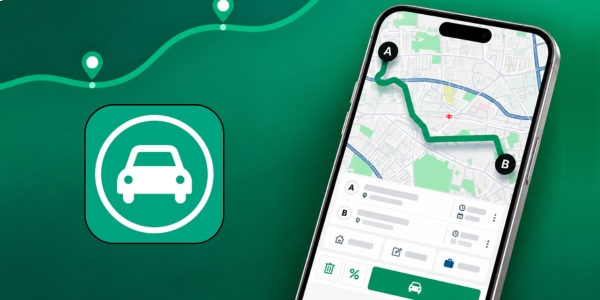
Mileage Tracker by Driversnote is an option for those who want to let their phone take care of recording trips.
The app uses GPS to track trips and allows you to classify each trip as business or personal.
It is also possible to create reports and track different vehicles.
- Automatic trip recording.
- Classification between personal and business use.
- Detailed reports.
- Export to PDF and Excel.
- Recording of different vehicles.
- Location and destination tracking.
- Reminders to record the odometer.
How to Use It
- Create your account in the app.
- Enter the main vehicle information.
- Enable the necessary GPS access.
- Start recording before leaving.
- Classify the trip when you arrive.
- Check your records and reports whenever you need them.
The app also allows you to add a trip manually if you forgot to record it.
Premium: the plans currently available start at US$ 14 per month. There is also an annual option for US$ 150.
MileIQ App

MileIQ focuses heavily on practicality for those who want a mileage tracker running in the background.
The app automatically identifies trips and allows you to classify them as business or personal.
It also offers reports and cloud storage for records.
- Automatic trip detection.
- Trip classification.
- Custom reports.
- Cloud storage.
- Calculation of trip value.
- Vehicle and schedule settings.
- Option to use kilometers or miles.
How to Use It
- Create your account in the app.
- Install the app on your phone.
- Allow the necessary location access.
- Drive normally and let the app record.
- Review the recorded trips.
- Classify each trip as personal or business.
- Generate your reports whenever you need them.
The app also allows you to set a custom mileage rate and choose between kilometers and miles.
Premium: the free plan allows up to 40 trips per month.
To have unlimited trips, you can choose the individual plan for US$ 13.99 per month or the annual option for around US$ 139.99.
Simply Auto App
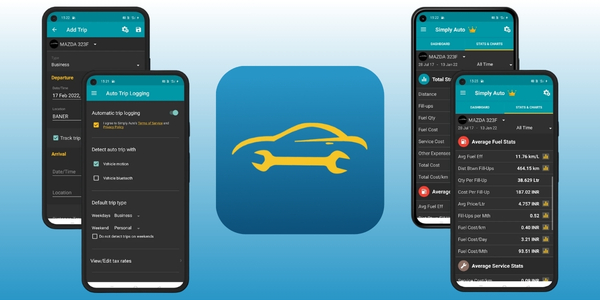
If you want a mileage tracker, Simply Auto can be a good option.
It also helps you keep track of fuel and maintenance.
It brings together records of trips, fuel purchases, expenses, and vehicle services in one place.
- GPS trip recording.
- Fuel tracking.
- Vehicle expenses.
- Maintenance reminders.
- Fuel consumption statistics.
- Support for multiple vehicles.
- Data export.
- Cloud backup.
How to Use It
- Register your vehicle to start organizing the data.
- Enter the current mileage.
- Add your fuel purchases and their respective amounts.
- Enable trip recording through GPS.
- Add expenses, services, and other costs.
- Track the vehicle’s charts and statistics.
The app also allows you to track costs per distance, fuel consumption, and maintenance expenses.
Premium: Simply Auto offers a GOLD purchase for US$ 9.99, in addition to the monthly option of US$ 1.49.
How to Track your Expenses for every Mile Driven
A mileage tracker can become even more useful when you compare the distance driven with your car expenses.
Imagine driving a lot and only realizing at the end of the month how much you spent.
By recording fuel purchases, maintenance, and other costs, it becomes easier to understand how much your vehicle really costs.
You can keep track of:
- Fuel.
- Maintenance.
- Tolls.
- Parking.
- Unexpected expenses.
- Average cost per kilometer.
This view helps you identify patterns and notice when the car is becoming more expensive to maintain.
And is there anything better than finding out where your money is going before it mysteriously disappears?

Mileage and Maintenance: Is there a Connection?
Yes, and using a mileage tracker can make keeping track of this much easier.
Many car services are performed based on mileage or time.
Therefore, recording the distance helps you remember when a particular maintenance service may be approaching.
You can use the tracker to:
- Keep track of oil changes and stay up to date with this maintenance.
- Remember inspections and avoid important delays.
- Record services performed on the vehicle.
- Monitor the tires and keep track of their condition.
- Control mechanical expenses and other maintenance costs.
- Check how far you have driven since the last maintenance to plan the next one.
In Simply Auto, for example, it is possible to create reminders by mileage or date.
This way, the record stops being just a list of trips and becomes part of organizing your vehicle.
Is it Worth Recording Mileage every Day?
Using a mileage tracker every day may seem like overkill at first.
But when the recording happens automatically, you practically don’t have to think about it.
The important thing is to keep the data organized and review your trips from time to time.
This can help you:
- Understand your driving habits.
- Control expenses.
- Organize business trips.
- Keep track of maintenance.
- Avoid forgetting important trips.
- Create a vehicle history.
In the end, recording mileage doesn’t have to become another obligation in your routine.
Choose an app that matches your driving style, set everything up once, and let technology do the heavy lifting.
Your car keeps accumulating miles.
At least now, with a mileage tracker, you know exactly where they are going!