Want to edit photos without spending hours learning complicated tools?
Anúncios
Some apps can make an image much more beautiful in just a few taps.
But which one matches the result you want to create?
The answer may be in features that go far beyond filters!
Canva App: Quickly Create and Edit Images

If the idea is to edit photos and already turn the result into content, Canva is a very practical option.
Its advantage is how easy it is to go from the original photo to a complete creation.
Among the features that can make editing easier are:
- Background remover
- Image filters and adjustments
- Resizing
- Texts and graphic elements
- Templates for social media
- AI tools
- Effects and animations
- Library of images and elements
Is Premium worth paying for?
Canva Pro offers additional features to make your edits even more complete.
The subscription costs US$ 14.99 per month or US$ 119.99 per year.
Snapseed App: Practical Tools for Editing your Photos
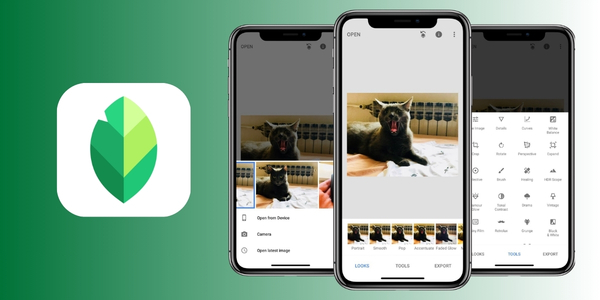
If you want to edit photos with plenty of freedom without paying for a subscription, Snapseed deserves your attention.
Developed by Google, the app brings together more than 30 tools and filters, with no purchases, ads or watermarks.
Snapseed lets you adjust specific details of an image without requiring you to be a photography expert.
Some of its standout features include:
- Curves
- White balance
- Selective adjustments
- HDR
- Perspective
- Blur
- Film effects
- Text and frames
- Double exposure
For those who want to spend nothing
Snapseed is a great alternative for anyone who does not want to start a subscription just to improve their photos.
You can make anything from a quick lighting correction to more careful adjustments to color and composition.
Just open, edit and done!
Lightroom App: Complete Features to Bring your Photos to Life

Now, an option for those who want more control to edit photos.
The app offers tools for working with:
- Exposure and lighting
- Temperature and colors
- Contrast
- Sharpness
- Textures
- Shadows and highlights
- Curves
- Effects
- Masks
- Element removal
There are also AI features to speed up some tasks and tools designed for different editing workflows.
Is Premium worth paying for?
It is worth it if you are looking for more advanced features and greater control over editing.
Lightroom has a free version, while the Premium plan starts at US$ 11.99 per month, with 1 TB of storage.
The Photography plan, with Lightroom and Photoshop, costs US$ 19.99 per month.
Choose the App that Best Matches the Style of your Photos
Now comes the part that really matters: which app should you choose?
There is no absolute winner. The best one depends on the type of editing you intend to do.
| If you want to… | A good option |
|---|---|
| Create posts and designs | Canva |
| Edit for free | Snapseed |
| Make detailed adjustments | Lightroom |
| Remove backgrounds | Canva or Lightroom |
| Work with RAW | Snapseed or Lightroom |
| Create content for social media | Canva |
| Control colors and lighting | Snapseed or Lightroom |
If you like creating complete posts, Canva will probably make more sense.
For those who want to improve photos for free, Snapseed is a great choice.
Lightroom, on the other hand, may appeal to those who want to explore colors, light and finishing more deeply.
Features that Make Editing Simpler and more Creative
The best features to edit photos aren’t always the most impressive ones.
A simple tool can save several minutes and make the result much better.
Background removal
It is useful for highlighting a person, product or object and creating a different composition.
Automatic adjustments
They can serve as a starting point for improving lighting, contrast and colors before making manual adjustments.
Filters and presets
They are great when you want to quickly apply a certain style.
AI tools
They can make tasks such as object removal, adjustments and element creation easier.
Selective editing
It allows you to work on just one area of the photo without changing the entire image.
Don’t forget, the secret is choosing tools that actually make what you want to do easier.
You don’t need to use fifteen features just because they are there!
Tips to Improve your Photos without Overdoing the Adjustments
To edit photos doesn’t mean completely transforming the original image.
Small adjustments tend to make the result look more natural and pleasant.
Start with lighting when you edit photos, correcting images that are too dark or bright before adjusting colors.
Then, adjust contrast and temperature little by little. Very intense colors can make the image look artificial.
Before saving, do this test compare the edited version with the original. And ask yourself:
- Did the lighting improve?
- Do the colors still look natural?
- Does the face maintain a realistic appearance?
- Did the details become clearer?
- Is any effect too strong?
If the answer is positive, you are probably on the right track!
Prepare your Photos to Share on Social Media
After you edit photos, there’s still a final step: preparing them for publication.
A photo can look great in the editor but lose impact if cropped or exported incorrectly.
Before sharing, check the framing and make sure no important element is too close to the edges. Before publishing, check:
- Suitable format for the platform
- Framing
- Image quality
- Colors
- Important elements within the visible area
- File size
This is especially important when the same photo will be used on different social networks.
So, don’t be afraid to adapt the photo to each situation.
Conclusion
Edit photos easily and get great results without being a professional.
The most important thing is to choose the app that matches your goal and start little by little.
After all, good editing does not need to turn your photo into another image.
Sometimes, all you need to do is improve the lighting, enhance the colors and highlight that special moment.
So choose your editor, open that forgotten photo in your gallery and give it a chance.
Who knows, maybe your next favorite image is hiding right there?